Showing posts with label Adsense Approval Trick. Show all posts

Friday, 19 March 2021

I get Adsense Approval with 8k views and My Experience | 100% Approved

Welcome to ereviewmaster, in this tutorial I will talk about how I get Adsense approval with 8k views and my experience. I am going to share my personal learnings and observations that I have encountered while getting Adsense approval with 8k views for my Blogger website.

I get Adsense Approval with 8k views and My Experience

First of all, I like to mention that you should select a good and specific niche to post at least 20+ good quality, plagiarism-free articles. After your writing get completes then post those 20+ articles on your blog or website.

If you are using Blogger then while applying for the Adsense you will encounter an error with the message that your blog is not yet applicable for the Adsense program. To solve this issue, you need to purchase a custom domain for your blog from a domain distributing company online. Now, you can apply for the Google Adsense by visiting the Google Adsense website.


I have discussed the step by step procedure to apply for the Google Adsense on the Google Adsense Approval Trick article. You can visit and learn about the trick that will help you to get your Adsense approval easily. Before applying for Google Adsense, optimise your website and make it a professional website.

Pages Required to get Adsense Approval

4 specific pages you must include in your website before applying for the Google Adsense programme. These pages are: Disclaimer, Terms & Conditions, Privacy Policy and Contact Us page. You can easily generate these pages using Google search by term Disclaimer generator. Your website must include these pages in order to get Adsense Approval. These are the basic pages of a standard website. Extra pages you can add if you wish.

Traffic required for Adsense Approval

After posting 20+ articles on your website, grab some traffic through social media and also submit those articles on Google Search Console and Bing Webmaster to get indexed in Google. According to my experience, a minimum of 8000 overall views are required to get Adsense Approval. But this is a controversial figure, as nobody knows about the exact number of views to get Adsense Approval. 

Better, stay on the safe side and after posting 20+ article acquire at least 8k+ overall views on your blog or website. These are some basic criteria you must follow to get your website approved for Google Adsense. Also, this article is the secret behind I got Adsense Approval with 8k+ views.

Also, Check out other blogs:
Thank You, I feel that you found this article helpful and doesn't forget to share it with your loved ones.

How I got my Google Adsense Approval in my First attempt during Lockdown | Google Adsense Approval Trick

Hey my people, today in this tutorial of Google Adsense Approval Trick, I am going to share my personal verified trick of how I got my Google Adsense Approval in my first attempt during the lockdown 2020. I have shared in this article some of the most important basic Google Adsense Approval Trick which needs to be taken care of while applying for this programme.

Google AdSense Approval Trick
Google Adsense Approval Trick

In this post, I will talk in detail about the Google Adsense Approval Trick which I followed and personally validated it is on the below-given flowchart.
Google AdSense Approval Trick

My flowchart of Google Adsense Approval Trick is explained thoroughly below:

1. Log into your Gmail account. Open Google Adsense.

2. If you are having a custom domain(eg. anything.com) then Sign Up to your Google AdSense account. Provide the details like the URL(eg. anything.com) of your site, email address and click the radio button, finally click the Save And Continue button to go forward.
Google AdSense Approval Trick
Google Adsense Approval Trick
If you are applying for Adsense using a subdomain like anything.blogspot.com then tap on Continue in Blogger or else tap on the Use different URL button.
Google AdSense Approval Trick
Google Adsense Approval Trick
3. If you are a beginner and wanted to start blogging then you can continue applying for Adsense through Blogger. Log in to your Blogger account.

4. Tap the Earnings button from the left menu.
Google AdSense Approval Trick
Google Adsense Approval Trick
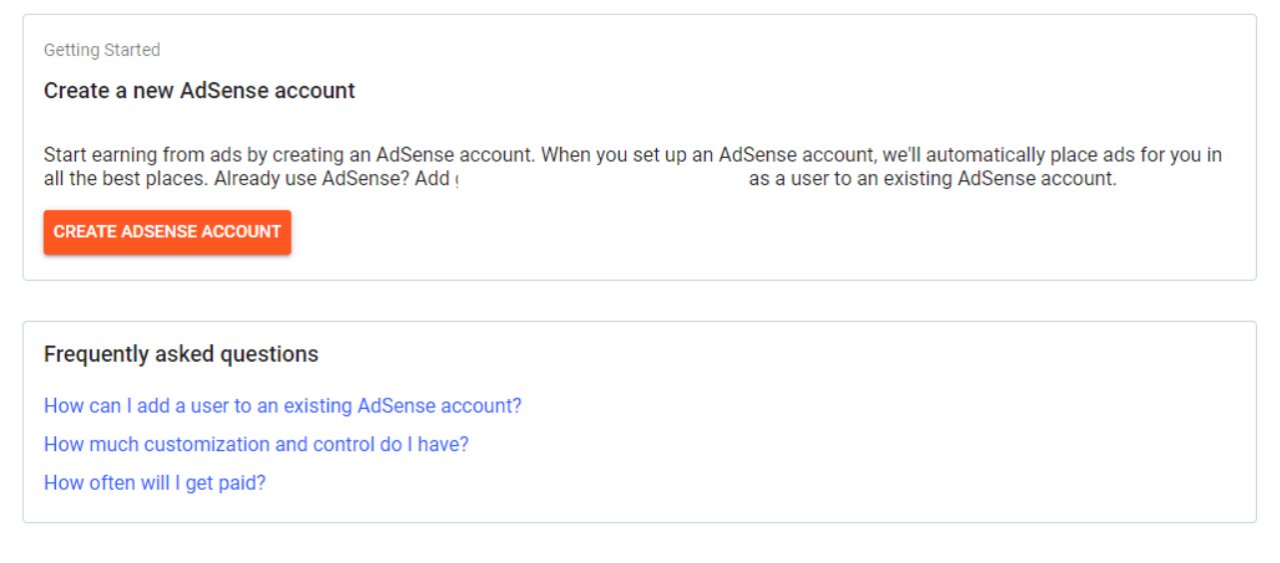
5. After clicking, you will end up having an option like Create Adsense Account button in Blogger.
Google AdSense Approval Trick
Google Adsense Approval Trick
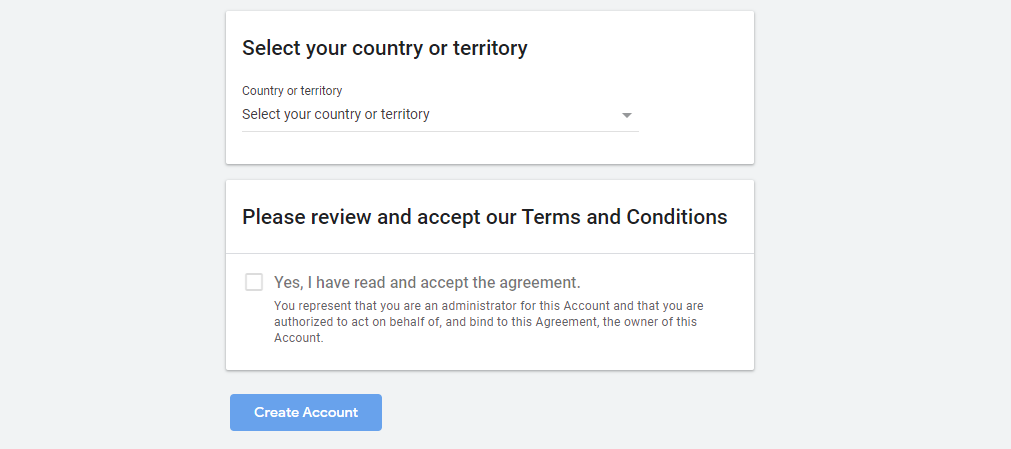
6. Tap on Create Adsense Account button, a new window will be opened.

7. You need to provide the below details to continue applying for the Adsense.
Google AdSense Approval Trick
Google Adsense Approval Trick
8. After filling up the form following my Google Adsense Approval Trick click on Create Account button.
Google AdSense Approval Trick
Google Adsense Approval Trick
Congratulations, your Adsense account has been created following Google Adsense Approval Trick.

Now, Click on the Get Started button that will be displayed on your screen. You will be asked to provide your personal details like Name, Address, Phone number etc and submit the filled form. On account type field provide individual if you are a beginner.

*Bonus Note: If you have already applied for the Adsense account previously through Youtube monetisation with a different email address but with the same details then I would suggest not to apply for the AdSense once again. As Google Adsense Only Support one account per individual.

If you apply again with a different email id but with the same details then your application will get rejected. Also, never try to change the address that you have provided as you have to submit your ID proof like Voter ID, Pan Card etc to get verified and also to withdraw your payment through the bank.

If you still apply for the programme then you will get stuck and will find an error like the below image. Many of the new bloggers face the same issue as they are not aware of it. Thus, they get stuck in this and could not continue with the blogging life.
Google AdSense Approval Trick
Google Adsense Approval Trick
 
*Pro Tips: Also, to verify that you don't have any other Adsense account check all your email ids logging in to the Google AdSense account.

If you already have an Adsense account then Sign In to your account following the steps mentioned in Google Adsense Approval Trick. Open Google Adsense, from the right corner sign in to your account.
After you have successfully Signed in, tap on the Sites button from the left menu and it will display on your screen as in the image below.
Google AdSense Approval Trick
Google Adsense Approval Trick
Click on Add site button and provide your site URL eg. anything.com and continue with Save and Continue button. After that, the screen will be displayed as the below image with the script code that needs to be copied and paste within your template <head> ... </head> tags.
Google AdSense Approval Trick
Google Adsense Approval Trick
To add the script, open your Blogger account. Goto Theme>Tap on Customize>Click Edit HTML>Search </head> using Ctrl+F and paste the script that you have copied previously. Now, tap on the Request Review button.
Google AdSense Approval Trick
Google Adsense Approval Trick
That's all you need to do to get your blog or website verified for Adsense. Approximately, within the next 6-7 working days you will get an email with a congratulations message from Google. If you have followed my Google Adsense Approval Trick seriously, I assure you that your blog will get approved.
*Extra Trick: Make sure your articles and images are free of plagiarism

After following my Google Adsense Approval Trick, you will get your website approved and if you ever face any issue feel free to contact me. I will love to help you in this regard. If you find my Google Adsense Approval Trick article valuable then share to your beloved ones who are facing issue in approving their website or blog for the Google Adsense.
 
Signing-off!